
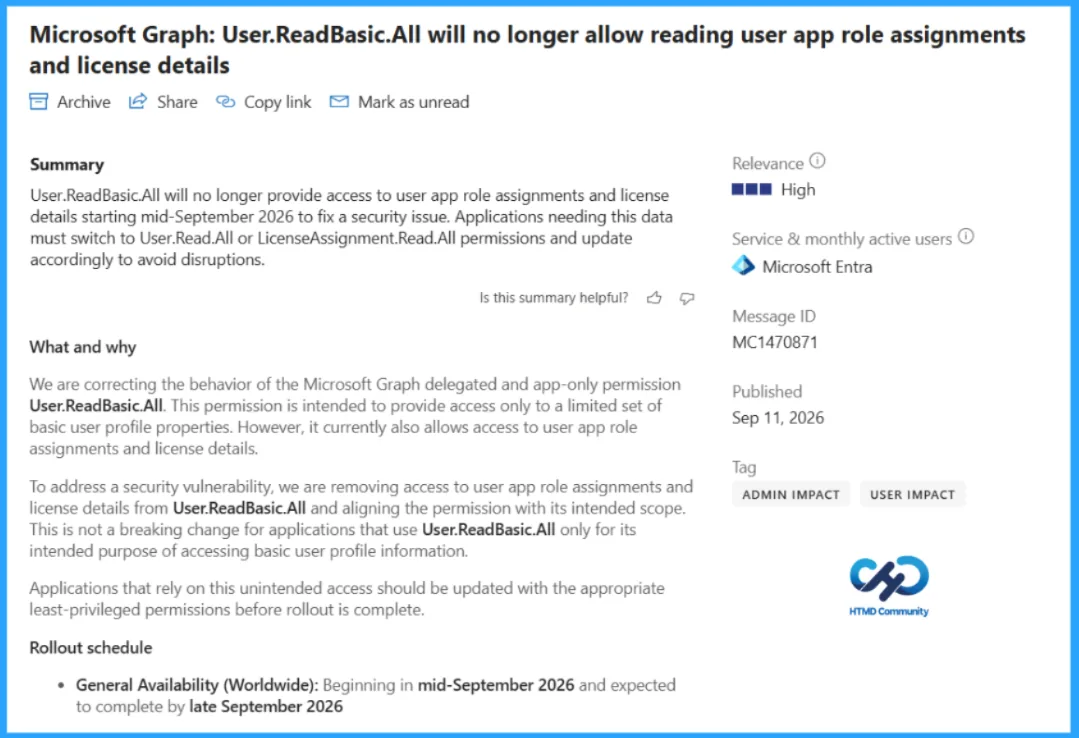
Microsoft is changing how the Microsoft Graph permission User.ReadBasic.All behaves. The permission was intended to provide a limited set of basic user profile properties, but it has also allowed applications to read user app role assignments and license details. That additional access is being removed because it does not match the intended scope of the permission and creates a security concern. The change applies to both delegated and app-only access.
Applications that use User.ReadBasic.All only for basic profile information should continue to work. Applications that depend on it for app role assignments or license information may fail or return permission-related errors after the change reaches the tenant.
This article explains what is changing, why Graph permissions matter, which applications may be affected, and what administrators and application owners should review.
Key Takeaways
User.ReadBasic.Allis being aligned with its intended purpose of providing basic user profile information.- It will no longer provide access to user app role assignments or user license details.
- The change affects both delegated and app-only permission scenarios.
- The worldwide rollout is planned from mid-September through late September 2026.
- Applications that read only basic profile properties should continue to work without modification.
- Applications relying on the unintended access should move to an appropriate least-privileged permission and be tested.
What Is Changing with User.ReadBasic.All?
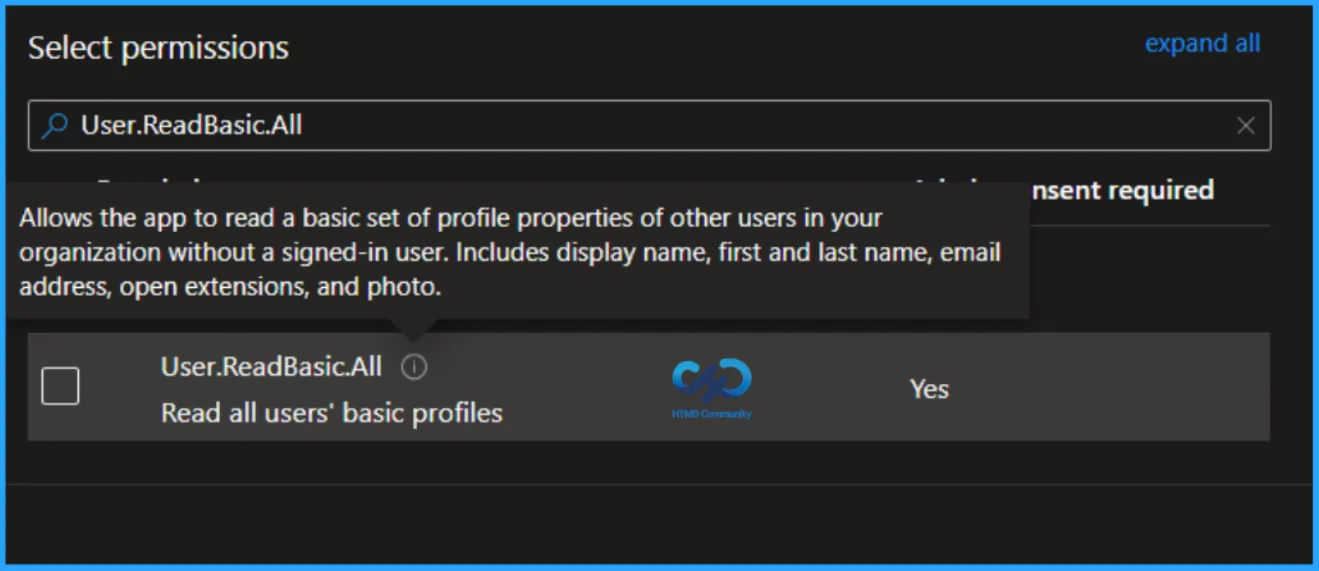
User.ReadBasic.All is designed to let an application read a limited set of basic properties for users in an organization. Microsoft found that the permission also provided access to user app role assignments and license details, even though those data types fall outside its intended scope.
Microsoft is removing that extra access. Once the change is applied, an application with only User.ReadBasic.All will no longer be able to retrieve app role assignments or license details. Basic profile queries, including requests for properties such as display name, email address, or department, are expected to continue working.
Why Graph Permissions Are Important
Microsoft Graph permissions define what an application can access and whether that access happens on behalf of a signed-in user or through the application itself. They form an important security boundary between an application and organizational data.
A permission that is broader than the application needs increases the amount of data that could be exposed if the application, its credentials, or its consent process is compromised. A permission that is too narrow can prevent a legitimate workflow from functioning. This is why permission decisions should be based on the exact Graph request, the authentication model, and the data the application genuinely requires.
The MC1470871 change is a useful reminder that a working application is not always proof that its permission design is correct. Some solutions may have depended on behavior that was more permissive than the published purpose of User.ReadBasic.All. Reviewing actual API calls is therefore more reliable than checking permission names alone.
Who May Be Affected?
An organization is affected when an application uses delegated or app-only User.ReadBasic.All access to read user app role assignments or user license details. The impact is not limited to interactive applications. It may also appear in background processes and integrations.
- Internal applications — Custom portals or business tools that combine user profile, licensing, or role assignment information.
- Automation and scripts — PowerShell scripts, scheduled jobs, Azure Functions, and offboarding or reporting workflows that query Graph.
- Reporting solutions — Dashboards or inventory processes that collect user license or application assignment data.
- Third-party integrations — Products that were granted
User.ReadBasic.Allbut use it beyond basic profile properties.
What Should Organizations Review?
The most useful review starts with actual application behavior. Not every application that holds User.ReadBasic.All will be affected, so administrators should avoid replacing it with a broader permission without first confirming the requirement.
- Identify applications using
User.ReadBasic.All: Review application registrations, enterprise applications, scripts, and integrations that have been granted the permission. - Inspect the Graph calls: Confirm whether the application requests basic profile properties, app role assignments, license details, or a combination of these.
- Check the authentication model: Determine whether the application uses delegated access, app-only access, or both, because the required permission must match the flow.
- Select the narrowest suitable permission: Use a permission that matches the required data. The Message Center notice points to
User.Read.Allfor broader user information andLicenseAssignment.Read.Allfor license-related access. - Update consent and configuration: Change the app registration or deployment configuration and obtain administrator consent where required.
- Test and document the result: Run the workflow, monitor for access-denied or missing-data responses, and record the owner, reason, approval, test result, and rollback plan.
Before and After the Change
The following table provides a clear side-by-side view of how access and behavior have changed. It contrasts what was available before with what is enforced now, making it easier to understand the impact on applications and the steps administrators should take.
| Area | Before the change | After the change |
|---|---|---|
| Basic profile data | Available through User.ReadBasic.All. |
Continues to be available for the intended basic profile properties. |
| App role assignments | Could be read through unintended access. | No longer available when User.ReadBasic.All is the only relevant permission. |
| License details | Could be read through unintended access. | No longer available when User.ReadBasic.All is the only relevant permission. |
| Application impact | Existing applications may appear to work. | Affected applications may return permission errors or lose expected data. |
| Administrator response | No immediate action may have been visible. | Review Graph usage, apply the appropriate least-privileged permission, and test. |
Table 1: Before and after the User.ReadBasic.All change. Source: Microsoft.
Practical Testing Considerations
Testing should focus on the exact operations the application performs. A successful request for a display name does not prove that a license or app role assignment request will continue to work. Test each affected endpoint and workflow using the revised permission configuration.
- Run the application with the updated permission in a controlled environment.
- Check for access-denied responses, incomplete records, or missing license and role data.
- Validate both delegated and app-only paths when the solution supports both.
- Confirm that administrator consent and deployment configuration are consistent across environments.
- Monitor scheduled jobs and unattended automations after the rollout reaches the tenant.
Conclusion
MC1470871 is a security-focused correction rather than a new Microsoft Graph feature. Many applications will continue working because they use User.ReadBasic.All only for its intended purpose. The main risk is with solutions that quietly depend on the permission for app role assignments or license information.
Organizations should avoid granting broad permissions as a quick fix. Instead, confirm the required data, choose the narrowest suitable permission, test the complete workflow, and document the decision. This reduces avoidable disruption while improving the overall permission posture of the environment.
Reference Links
HTMD Consultancy
Get in touch with us to streamline your IT and security solutions. Let us help you fix complex issues and provide streamlined solutions for complex migration projects. Follow us on LinkedIn.