
Managing devices at scale is not just about creating policies and deploying applications. It is equally important to ensure that changes reach users in a controlled and predictable manner. A single misconfigured policy or problematic application can impact thousands of devices if deployed instantly across the organization.
To address this challenge, Microsoft Intune now introduces Deployments, a feature designed to help IT administrators roll out apps and device configurations gradually. Instead of targeting every device at once, organizations can use deployment rings to validate changes with smaller groups before expanding to broader audiences.
This approach brings more confidence, flexibility, and control to large-scale device management. It allows IT teams to identify issues early, reduce deployment risk, and improve the overall end-user experience. For organizations already using phased update strategies, Intune Deployments brings that same methodology directly into modern endpoint management.
Key Takeaways
- Intune Deployments enable staged rollouts of apps and policies using deployment rings.
- Deployment Plans provide reusable templates for consistent deployment strategies.
- IT teams can pause, resume, or cancel deployments when issues are detected.
- Gradual deployments reduce the risk of organization-wide incidents.
- Deployment rings help validate changes with pilot users before wider release.
- The feature simplifies rollout management and reduces administrative effort.
- Deployments are currently available in public preview for selected workloads.
Why Traditional Deployments Can Be Risky
Many organizations still deploy policies and applications to large device groups in a single action. While this approach is straightforward, it significantly increases operational risk. If an application fails, a policy is misconfigured, or unexpected compatibility issues appear, the impact can be immediate and widespread.
IT teams often compensate by manually creating pilot groups, waiting for feedback, and then editing assignments multiple times. While effective, this process requires additional administration and can become difficult to manage as organizations grow. A more structured deployment framework helps eliminate these challenges.
What Are Intune Deployments?
Intune Deployments introduce a controlled rollout process for applications and device configuration policies. Instead of delivering a change to every targeted device at the same time, administrators can define multiple deployment stages, commonly called rings. Each ring receives the deployment according to a predefined schedule.
For example, an organization might deploy a new security policy to a small IT pilot group first, then to a regional department, and finally to all managed devices. This gradual rollout allows administrators to validate success at each stage before proceeding. The result is a safer and more predictable deployment experience.
The deployments feature in Intune is built around two key components. Deployment plans act as reusable templates that define a standardized rollout pattern, while deployments serve as the execution mechanism that delivers a specific Intune payload to devices. In this context, a payload refers to an Intune app or device configuration policy. Administrators can access and manage deployments directly in the Microsoft Intune admin center by navigating to Devices > Manage devices > Deployments.
Understanding Deployment Plans
A Deployment Plan acts as the blueprint for a rollout strategy. Rather than creating deployment stages every time a new application or policy needs to be released, administrators can build a reusable deployment structure once and use it repeatedly. This promotes consistency across the organization and helps ensure that every rollout follows approved operational practices. A deployment plan defines the following elements:
- The rollout rings
- Target groups
- Excluded groups
- Time delays between deployment stages
- Platform-specific deployment behavior
Because the plan contains only the rollout structure and not the actual application or policy, it can be reused across multiple deployment scenarios.
The Real Value of Deployment Plans
Deployment plans provide significant benefits by establishing standardization across the organization. They define approved rollout patterns and ensure that deployments follow vetted, corporate-sanctioned structures. This helps administrators maintain alignment with organizational policies while reducing the risk of inconsistent practices.
Another key advantage is consistency. Deployment plans allow reuse of well-designed configurations, eliminating the need to manually recreate multiring assignments for each rollout. This not only saves time but also ensures that every deployment follows the same tested approach, improving reliability across different teams and environments.
Deployment plans also enable safer rollouts by embedding staged rollout practices directly into the process. Payloads are gradually offered to devices across defined rings, reducing risk and allowing administrators to monitor performance before expanding to broader groups. At the same time, they reduce administrative overhead by removing the need for manual segmentation of devices or users and repeated modifications during rollout.
Finally, deployment plans promote predictable deployment behavior by providing precise control over when a payload is offered to devices. They serve as a centralized source of truth for rollout practices, ensuring consistent patterns across departments, regions, or teams. In summary, deployment plans define a reusable rollout structure, including rings, deferred timing between rings, and group assignments. While plans do not contain or deliver the payload itself, they govern how a rollout should occur, with deployments executing the rollout for a specific payload.
Public Preview Supported Platforms
The following platforms and payloads are supported during the public preview of this feature. For Enterprise App Catalog apps, updates with supersedence are supported, while automatic updates are not available through deployments.
| Supported platform | Payload category | Supported payload |
|---|---|---|
| Windows 10 and later | Policy (device configuration) | Endpoint security policies; Settings catalog |
| Windows 10 and later | Apps | Windows app (Win32); Enterprise App Catalog app |
Table 1: Public preview supported platforms. Source: Microsoft Learn.
How Deployments Work
Administrators use deployments to deliver an Intune payload, such as an app or policy, to devices through a controlled rollout. A deployment can be created using a deployment plan or by manually configuring rings, timing, and group assignments. Once initiated, the rollout can be paused, resumed, or canceled depending on organizational needs, giving admins flexibility in managing delivery.
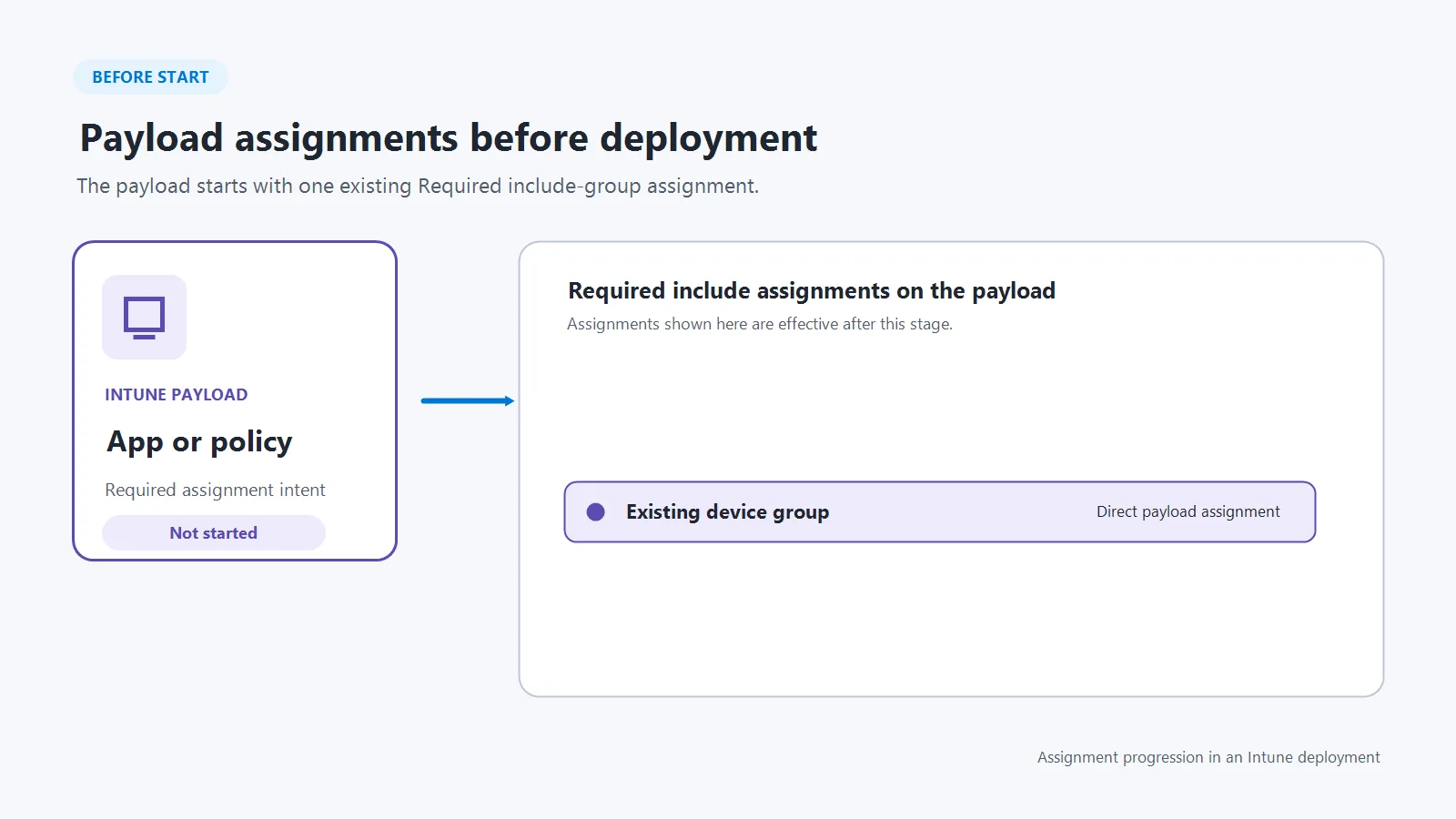
Each deployment has specific properties that define its behavior. It delivers a single payload, either through a plan or a one-time ring configuration, and supports only one payload at a time. While the name and description can be updated after creation, the selected payload, ring names, schedule, groups, and scope tags remain fixed. Additionally, a payload cannot be reused in another active or scheduled deployment, ensuring consistency and avoiding conflicts.
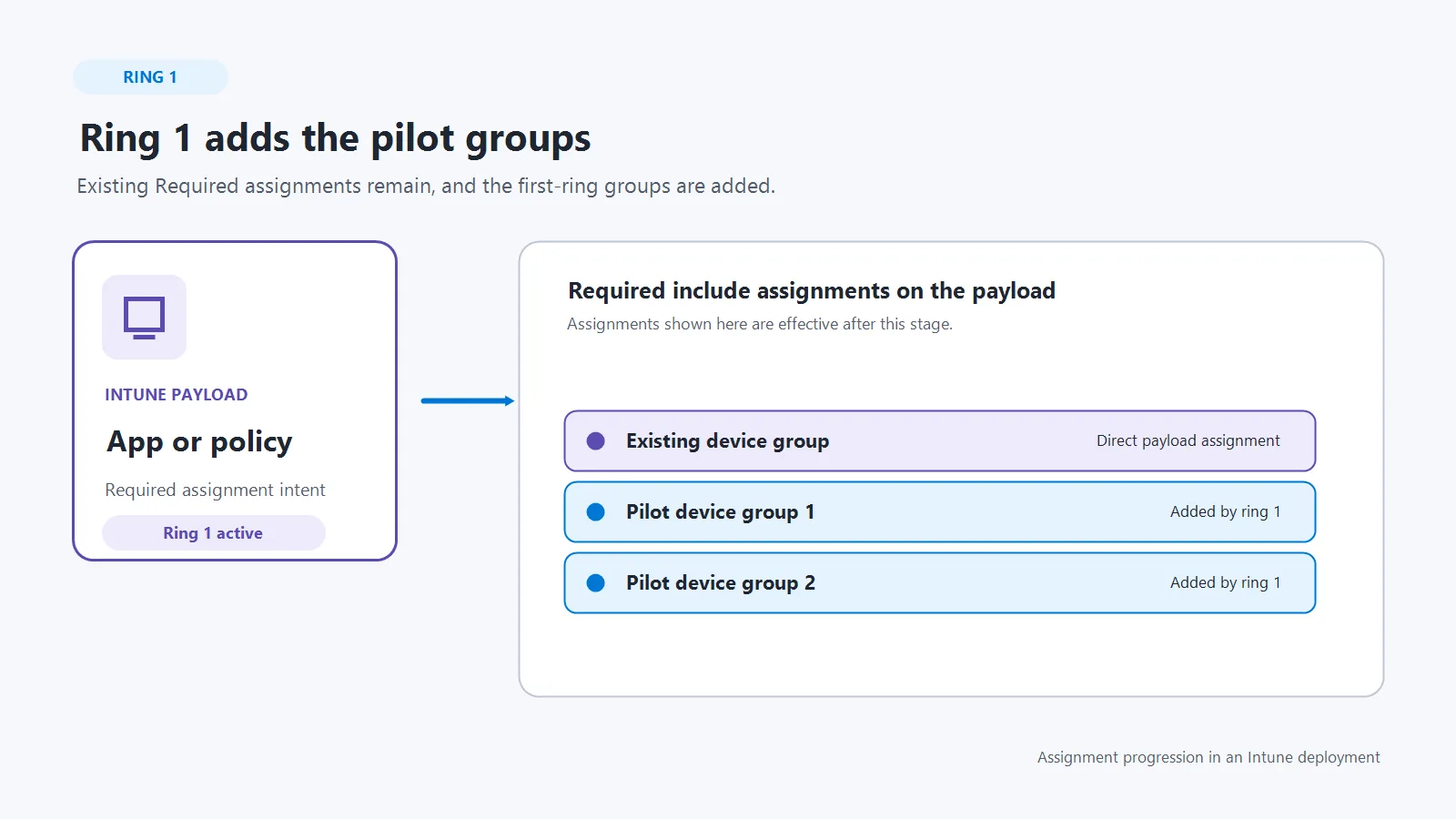
Deployment fundamentals establish how updates and group assignments are handled. A deployment does not lock its payload, meaning administrators can continue to update it directly. If changes are made before the next scheduled ring activates, existing groups receive the update during their next device check-in, while upcoming rings receive the latest version.
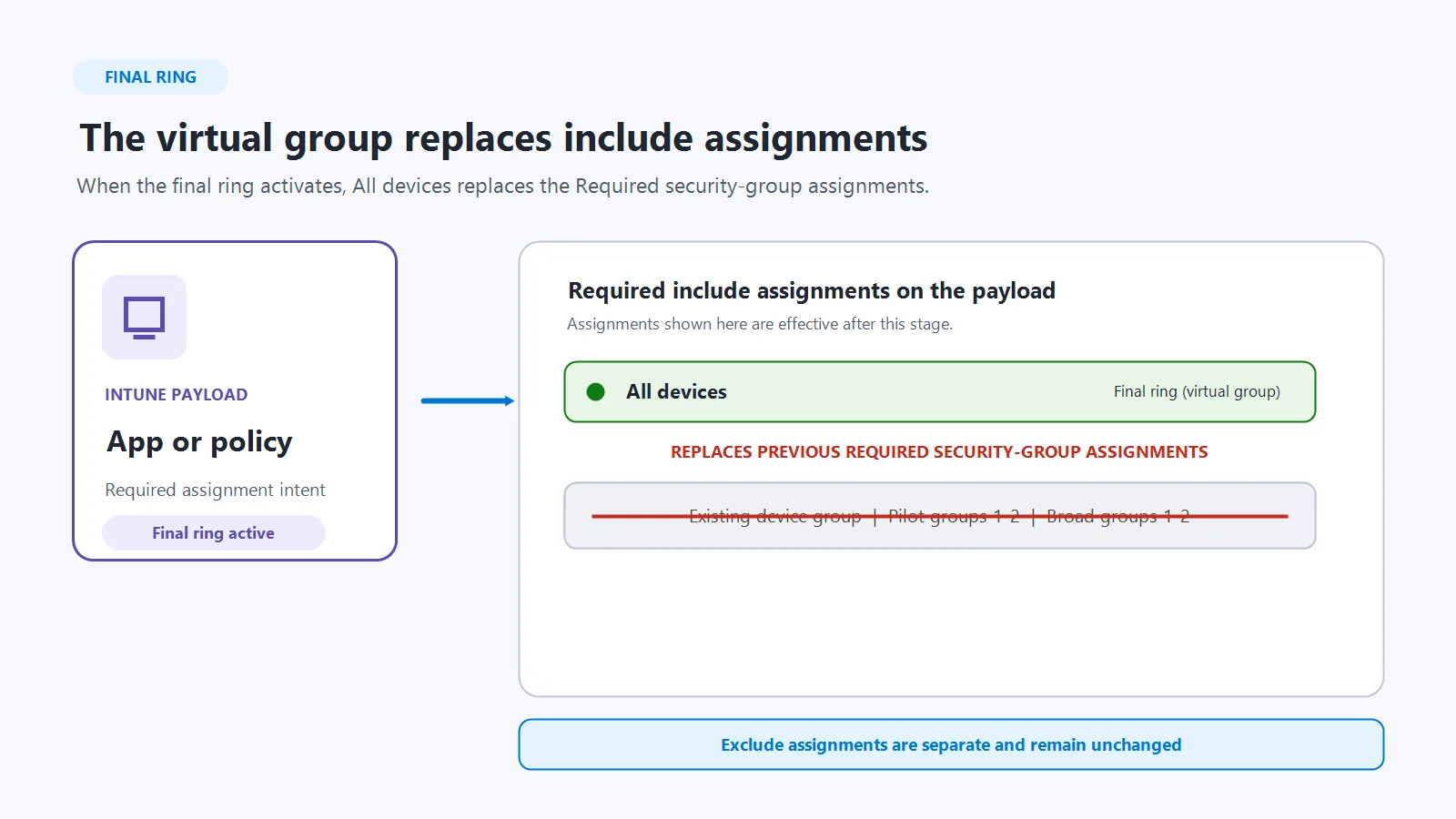
Include-group assignments accumulate as rings progress, while exclude groups apply across all rings. Intune also checks for assignment collisions at creation and during ring activation; collisions place the deployment in an error state until resolved.
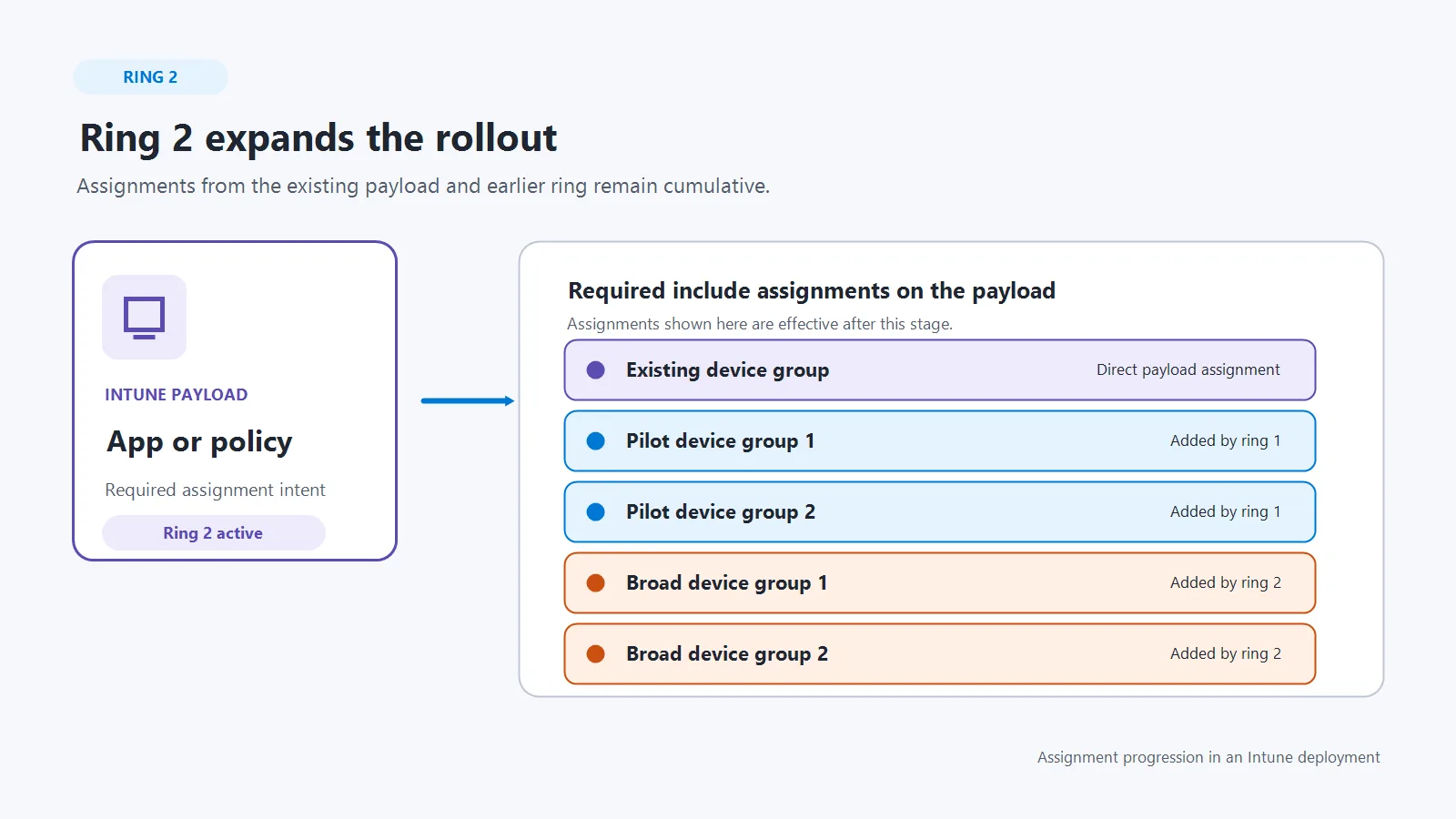
Finally, deployments follow certain rules for timing and scope. Rings must be spaced at least one hour apart, and any ring that includes the All users or All devices virtual group automatically becomes the final ring. For Windows apps (Win32) and Enterprise App Catalog apps, only the Required install intent is supported — Available and Uninstall intents are not. These rules ensure deployments remain predictable, secure, and aligned with best practices for gradual rollout.
Conclusion
For years, IT administrators have relied on manual pilot groups and phased release processes to reduce deployment risk. Microsoft Intune Deployments formalizes this approach and brings it directly into the Intune platform.
The combination of Deployment Plans and ring-based deployments provides a structured, repeatable, and safer way to deliver applications and policies. Instead of treating every deployment as a one-off activity, organizations can establish a standardized rollout framework that improves reliability and operational consistency.
As endpoint management continues to evolve, controlled deployments will become increasingly important. Intune Deployments represent a significant step toward more predictable, enterprise-ready change management in the modern workplace.
Reference Links
HTMD Consultancy
Get in touch with us to streamline your IT and security solutions. Let us help you fix complex issues and provide streamlined solutions for complex migration projects. Follow us on LinkedIn.